# Magic-TryOn
**Repository Path**: nnn/Magic-TryOn
## Basic Information
- **Project Name**: Magic-TryOn
- **Description**: No description available
- **Primary Language**: Unknown
- **License**: Apache-2.0
- **Default Branch**: main
- **Homepage**: None
- **GVP Project**: No
## Statistics
- **Stars**: 0
- **Forks**: 0
- **Created**: 2025-08-01
- **Last Updated**: 2025-08-01
## Categories & Tags
**Categories**: Uncategorized
**Tags**: None
## README




 **MagicTryOn** is a video virtual try-on framework based on a large-scale video diffusion Transformer. ***1) It adopts Wan2.1 diffusion Transformer as the backbone*** and ***2) employs full self-attention to model spatiotemporal consistency***. ***3) A coarse-to-fine garment preservation strategy is introduced, along with a mask-aware loss to enhance garment region fidelity***.

## 📣 News
- **`2025/06/09`**: 🎉 We are excited to announce that the ***code*** of [**MagicTryOn**](https://github.com/vivoCameraResearch/Magic-TryOn/) have been released! Check it out! ***The weights are released !!!***. You can download the weights from 🤗[**HuggingFace**](https://huggingface.co/LuckyLiGY/MagicTryOn).
- **`2025/05/27`**: Our [**Paper on ArXiv**](https://arxiv.org/abs/2505.21325v2) is available 🥳!
## ✅ To-Do List for MagicTryOn Release
- ✅ Release the source code
- ✅ Release the inference demo and pretrained weights
- ✅ Release the customized try-on utilities
- [ ] Update Gradio App and MagicTryOn_1.3B weights
- [ ] Release the testing scripts
- [ ] Release the training scripts
- [ ] Release the MagicTryOn_V2
## 😍 Installation
Create a conda environment & Install requirments
```shell
# python==3.12.9 cuda==12.3 torch==2.2
conda create -n magictryon python==3.12.9
conda activate magictryon
pip install -r requirements.txt
# or
conda env create -f environment.yaml
```
If you encounter an error while installing Flash Attention, please [**manually download**](https://github.com/Dao-AILab/flash-attention/releases) the installation package based on your Python version, CUDA version, and Torch version, and install it using `pip install flash_attn-2.7.3+cu12torch2.2cxx11abiFALSE-cp312-cp312-linux_x86_64.whl`.
Use the following command to download the weights:
```PowerShell
cd Magic-TryOn
HF_ENDPOINT=https://hf-mirror.com huggingface-cli download LuckyLiGY/MagicTryOn --local-dir ./weights/MagicTryOn_14B_V1
```
## 😉 Demo Inference
### 1. Image TryOn
You can directly run the following command to perform image try-on demo. If you want to modify some inference parameters, please make the changes inside the `predict_image_tryon_up.py` file.
```PowerShell
CUDA_VISIBLE_DEVICES=0 python inference/image_tryon/predict_image_tryon_up.py
CUDA_VISIBLE_DEVICES=1 python inference/image_tryon/predict_image_tryon_low.py
```
### 2. Video TryOn
You can directly run the following command to perform image try-on demo. If you want to modify some inference parameters, please make the changes inside the `predict_video_tryon_up.py` file.
```PowerShell
CUDA_VISIBLE_DEVICES=0 python inference/video_tryon/predict_video_tryon_up.py
CUDA_VISIBLE_DEVICES=1 python inference/video_tryon/predict_video_tryon_low.py
```
### 3. Customize TryOn
Before performing customized try-on, you need to complete the following five steps to obtain:
1. **Cloth Caption**
Generate a descriptive caption for the garment, which may be used for conditioning or multimodal control. We use [**Qwen/Qwen2.5-VL-7B-Instruct**](https://huggingface.co/Qwen/Qwen2.5-VL-7B-Instruct) to obtain the caption. Before running, you need to specify the folder path.
```PowerShell
python inference/customize/get_garment_caption.py
```
2. **Cloth Line Map**
Extract the structural lines or sketch of the garment using [**AniLines-Anime-Lineart-Extractor**](https://github.com/zhenglinpan/AniLines-Anime-Lineart-Extractor). Download the pre-trained models from this [**link**](https://drive.google.com/file/d/1oazs4_X1Hppj-k9uqPD0HXWHEQLb9tNR/view?usp=sharing) and put them in the `inference/customize/AniLines/weights` folder.
```PowerShell
python inference/customize/AniLines/infer.py --dir_in datasets/garment/vivo/vivo_garment --dir_out datasets/garment/vivo/vivo_garment_anilines --mode detail --binarize -1 --fp16 True --device cuda:1
```
3. **Mask**
Generate the agnostic mask of the garment, which is essential for region control during try-on. Please [**download**](https://drive.google.com/file/d/1E2JC_650g69AYrN2ZCwc8oz8qYRo5t5s/view?usp=sharing) the required checkpoint for obtaining the agnostic mask. The checkpoint needs to be placed in the `inference/customize/gen_mask/ckpt` folder.
(1) You need to rename your video to `video.mp4`, and then construct the folders according to the following directory structure.
```
├── datasets
│ ├── person
| | ├── customize
│ │ │ ├── video
│ │ │ │ ├── 00001
│ │ │ │ │ ├── video.mp4
| | | | ├── 00002 ...
│ │ │ ├── image
│ │ │ │ ├── 00001
│ │ │ │ │ │ ├── images
│ │ │ │ │ │ │ ├── 0000.png
| | | | ├── 00002 ...
```
(2) Using `video2image.py` to convert the video into image frames and save them to `datasets/person/customize/video/00001/images`.
(3) Run the following command to obtain the agnostic mask.
```PowerShell
python inference/customize/gen_mask/app_mask.py
# if extract the mask for lower_body or dresses, please modify line 65.
# if lower_body:
# mask, _ = get_mask_location('dc', "lower_body", model_parse, keypoints)
# if dresses:
# mask, _ = get_mask_location('dc', "dresses", model_parse, keypoints)
```
After completing the above steps, you will obtain the agnostic masks for all video frames in the `datasets/person/customize/video/00001/masks` folder.
4. **Agnostic Representation**
Construct an agnostic representation of the person by removing garment-specific features. You can directly run `get_masked_person.py` to obtain the Agnostic Representation. Make sure to modify the `--image_folder` and `--mask_folder` parameters. The resulting video frames will be stored in `datasets/person/customize/video/00001/agnostic`.
5. **DensePose**
Use DensePose to obtain UV-mapped dense human body coordinates for better spatial alignment.
(1) Install [**detectron2**](https://github.com/facebookresearch/detectron2).
(2) Run the following command:
```PowerShell
bash inference/customize/detectron2/projects/DensePose/run.sh
```
(3) The generated results will be stored in the `datasets/person/customize/video/00001/image-densepose` folder.
After completing the above steps, run the `image2video.py` file to generate the required customized videos: `mask.mp4`, `agnostic.mp4`, and `densepose.mp4`. Then, run the following command:
```PowerShell
CUDA_VISIBLE_DEVICES=0 python inference/video_tryon/predict_video_tryon_customize.py
```
## 😘 Acknowledgement
Our code is modified based on [VideoX-Fun](https://github.com/aigc-apps/VideoX-Fun/tree/main). We adopt [Wan2.1-I2V-14B](https://github.com/Wan-Video/Wan2.1) as the base model. We use [SCHP](https://github.com/GoGoDuck912/Self-Correction-Human-Parsing/tree/master), [openpose](https://github.com/CMU-Perceptual-Computing-Lab/openpose), and [DensePose](https://github.com/facebookresearch/DensePose) to generate masks. We use [detectron2](https://github.com/facebookresearch/detectron2) to generate densepose. We use [Qwen/Qwen2.5-VL-7B-Instruct](https://huggingface.co/Qwen/Qwen2.5-VL-7B-Instruct) to generate the cloth caption and [AniLines-Anime-Lineart-Extractor](https://github.com/zhenglinpan/AniLines-Anime-Lineart-Extractor) to obtain the cloth line map. Thanks to all the contributors!
## 😊 License
All the materials, including code, checkpoints, and demo, are made available under the [Creative Commons BY-NC-SA 4.0](https://creativecommons.org/licenses/by-nc-sa/4.0/) license. You are free to copy, redistribute, remix, transform, and build upon the project for non-commercial purposes, as long as you give appropriate credit and distribute your contributions under the same license.
## ⭐ Star History
[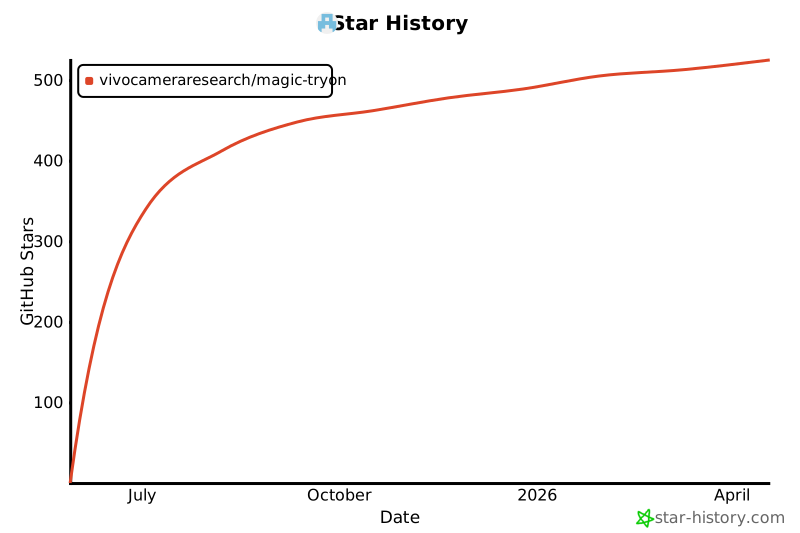](https://www.star-history.com/#vivoCameraResearch/Magic-TryOn&Date)
## 🤩 Citation
```bibtex
@misc{li2025magictryon,
title={MagicTryOn: Harnessing Diffusion Transformer for Garment-Preserving Video Virtual Try-on},
author={Guangyuan Li and Siming Zheng and Hao Zhang and Jinwei Chen and Junsheng Luan and Binkai Ou and Lei Zhao and Bo Li and Peng-Tao Jiang},
year={2025},
eprint={2505.21325},
archivePrefix={arXiv},
primaryClass={cs.CV},
url={https://arxiv.org/abs/2505.21325},
}
```
**MagicTryOn** is a video virtual try-on framework based on a large-scale video diffusion Transformer. ***1) It adopts Wan2.1 diffusion Transformer as the backbone*** and ***2) employs full self-attention to model spatiotemporal consistency***. ***3) A coarse-to-fine garment preservation strategy is introduced, along with a mask-aware loss to enhance garment region fidelity***.

## 📣 News
- **`2025/06/09`**: 🎉 We are excited to announce that the ***code*** of [**MagicTryOn**](https://github.com/vivoCameraResearch/Magic-TryOn/) have been released! Check it out! ***The weights are released !!!***. You can download the weights from 🤗[**HuggingFace**](https://huggingface.co/LuckyLiGY/MagicTryOn).
- **`2025/05/27`**: Our [**Paper on ArXiv**](https://arxiv.org/abs/2505.21325v2) is available 🥳!
## ✅ To-Do List for MagicTryOn Release
- ✅ Release the source code
- ✅ Release the inference demo and pretrained weights
- ✅ Release the customized try-on utilities
- [ ] Update Gradio App and MagicTryOn_1.3B weights
- [ ] Release the testing scripts
- [ ] Release the training scripts
- [ ] Release the MagicTryOn_V2
## 😍 Installation
Create a conda environment & Install requirments
```shell
# python==3.12.9 cuda==12.3 torch==2.2
conda create -n magictryon python==3.12.9
conda activate magictryon
pip install -r requirements.txt
# or
conda env create -f environment.yaml
```
If you encounter an error while installing Flash Attention, please [**manually download**](https://github.com/Dao-AILab/flash-attention/releases) the installation package based on your Python version, CUDA version, and Torch version, and install it using `pip install flash_attn-2.7.3+cu12torch2.2cxx11abiFALSE-cp312-cp312-linux_x86_64.whl`.
Use the following command to download the weights:
```PowerShell
cd Magic-TryOn
HF_ENDPOINT=https://hf-mirror.com huggingface-cli download LuckyLiGY/MagicTryOn --local-dir ./weights/MagicTryOn_14B_V1
```
## 😉 Demo Inference
### 1. Image TryOn
You can directly run the following command to perform image try-on demo. If you want to modify some inference parameters, please make the changes inside the `predict_image_tryon_up.py` file.
```PowerShell
CUDA_VISIBLE_DEVICES=0 python inference/image_tryon/predict_image_tryon_up.py
CUDA_VISIBLE_DEVICES=1 python inference/image_tryon/predict_image_tryon_low.py
```
### 2. Video TryOn
You can directly run the following command to perform image try-on demo. If you want to modify some inference parameters, please make the changes inside the `predict_video_tryon_up.py` file.
```PowerShell
CUDA_VISIBLE_DEVICES=0 python inference/video_tryon/predict_video_tryon_up.py
CUDA_VISIBLE_DEVICES=1 python inference/video_tryon/predict_video_tryon_low.py
```
### 3. Customize TryOn
Before performing customized try-on, you need to complete the following five steps to obtain:
1. **Cloth Caption**
Generate a descriptive caption for the garment, which may be used for conditioning or multimodal control. We use [**Qwen/Qwen2.5-VL-7B-Instruct**](https://huggingface.co/Qwen/Qwen2.5-VL-7B-Instruct) to obtain the caption. Before running, you need to specify the folder path.
```PowerShell
python inference/customize/get_garment_caption.py
```
2. **Cloth Line Map**
Extract the structural lines or sketch of the garment using [**AniLines-Anime-Lineart-Extractor**](https://github.com/zhenglinpan/AniLines-Anime-Lineart-Extractor). Download the pre-trained models from this [**link**](https://drive.google.com/file/d/1oazs4_X1Hppj-k9uqPD0HXWHEQLb9tNR/view?usp=sharing) and put them in the `inference/customize/AniLines/weights` folder.
```PowerShell
python inference/customize/AniLines/infer.py --dir_in datasets/garment/vivo/vivo_garment --dir_out datasets/garment/vivo/vivo_garment_anilines --mode detail --binarize -1 --fp16 True --device cuda:1
```
3. **Mask**
Generate the agnostic mask of the garment, which is essential for region control during try-on. Please [**download**](https://drive.google.com/file/d/1E2JC_650g69AYrN2ZCwc8oz8qYRo5t5s/view?usp=sharing) the required checkpoint for obtaining the agnostic mask. The checkpoint needs to be placed in the `inference/customize/gen_mask/ckpt` folder.
(1) You need to rename your video to `video.mp4`, and then construct the folders according to the following directory structure.
```
├── datasets
│ ├── person
| | ├── customize
│ │ │ ├── video
│ │ │ │ ├── 00001
│ │ │ │ │ ├── video.mp4
| | | | ├── 00002 ...
│ │ │ ├── image
│ │ │ │ ├── 00001
│ │ │ │ │ │ ├── images
│ │ │ │ │ │ │ ├── 0000.png
| | | | ├── 00002 ...
```
(2) Using `video2image.py` to convert the video into image frames and save them to `datasets/person/customize/video/00001/images`.
(3) Run the following command to obtain the agnostic mask.
```PowerShell
python inference/customize/gen_mask/app_mask.py
# if extract the mask for lower_body or dresses, please modify line 65.
# if lower_body:
# mask, _ = get_mask_location('dc', "lower_body", model_parse, keypoints)
# if dresses:
# mask, _ = get_mask_location('dc', "dresses", model_parse, keypoints)
```
After completing the above steps, you will obtain the agnostic masks for all video frames in the `datasets/person/customize/video/00001/masks` folder.
4. **Agnostic Representation**
Construct an agnostic representation of the person by removing garment-specific features. You can directly run `get_masked_person.py` to obtain the Agnostic Representation. Make sure to modify the `--image_folder` and `--mask_folder` parameters. The resulting video frames will be stored in `datasets/person/customize/video/00001/agnostic`.
5. **DensePose**
Use DensePose to obtain UV-mapped dense human body coordinates for better spatial alignment.
(1) Install [**detectron2**](https://github.com/facebookresearch/detectron2).
(2) Run the following command:
```PowerShell
bash inference/customize/detectron2/projects/DensePose/run.sh
```
(3) The generated results will be stored in the `datasets/person/customize/video/00001/image-densepose` folder.
After completing the above steps, run the `image2video.py` file to generate the required customized videos: `mask.mp4`, `agnostic.mp4`, and `densepose.mp4`. Then, run the following command:
```PowerShell
CUDA_VISIBLE_DEVICES=0 python inference/video_tryon/predict_video_tryon_customize.py
```
## 😘 Acknowledgement
Our code is modified based on [VideoX-Fun](https://github.com/aigc-apps/VideoX-Fun/tree/main). We adopt [Wan2.1-I2V-14B](https://github.com/Wan-Video/Wan2.1) as the base model. We use [SCHP](https://github.com/GoGoDuck912/Self-Correction-Human-Parsing/tree/master), [openpose](https://github.com/CMU-Perceptual-Computing-Lab/openpose), and [DensePose](https://github.com/facebookresearch/DensePose) to generate masks. We use [detectron2](https://github.com/facebookresearch/detectron2) to generate densepose. We use [Qwen/Qwen2.5-VL-7B-Instruct](https://huggingface.co/Qwen/Qwen2.5-VL-7B-Instruct) to generate the cloth caption and [AniLines-Anime-Lineart-Extractor](https://github.com/zhenglinpan/AniLines-Anime-Lineart-Extractor) to obtain the cloth line map. Thanks to all the contributors!
## 😊 License
All the materials, including code, checkpoints, and demo, are made available under the [Creative Commons BY-NC-SA 4.0](https://creativecommons.org/licenses/by-nc-sa/4.0/) license. You are free to copy, redistribute, remix, transform, and build upon the project for non-commercial purposes, as long as you give appropriate credit and distribute your contributions under the same license.
## ⭐ Star History
[](https://www.star-history.com/#vivoCameraResearch/Magic-TryOn&Date)
## 🤩 Citation
```bibtex
@misc{li2025magictryon,
title={MagicTryOn: Harnessing Diffusion Transformer for Garment-Preserving Video Virtual Try-on},
author={Guangyuan Li and Siming Zheng and Hao Zhang and Jinwei Chen and Junsheng Luan and Binkai Ou and Lei Zhao and Bo Li and Peng-Tao Jiang},
year={2025},
eprint={2505.21325},
archivePrefix={arXiv},
primaryClass={cs.CV},
url={https://arxiv.org/abs/2505.21325},
}
```