# python-office
**Repository Path**: ahun/python-office
## Basic Information
- **Project Name**: python-office
- **Description**: Python自动化办公的第三方库:pip install python-office
- **Primary Language**: Python
- **License**: Apache-2.0
- **Default Branch**: develop
- **Homepage**: None
- **GVP Project**: No
## Statistics
- **Stars**: 0
- **Forks**: 242
- **Created**: 2026-06-29
- **Last Updated**: 2026-06-29
## Categories & Tags
**Categories**: Uncategorized
**Tags**: None
## README
中文 ·
中文文档 ·
English

python-office
🚀 Office automation, one line of code at a time
73 ready-to-use Skills covering PDF, Word, Excel, PPT, Email, WeChat, Images, Video and more






---
## ⚡ TL;DR
> **python-office** is the most popular Python office-automation library in the Chinese-speaking world.
> One library covers 90% of office scenarios: **PDF / Word / Excel / PPT conversion, image processing, video & audio, WeChat bot, email, file management, OCR, AI tools**...
> Zero Python knowledge required — **every feature is one line of code**.
```python
pip install python-office
```
```python
import office # one import, all features available
```
---
## ✨ Key Features
| | Feature |
|---|---|
| 🎯 **One-line code** | 90% of features need only `office.module.method()` — zero learning curve |
| 🧩 **73 Skills** | Every feature independently importable, install only what you need |
| 🤖 **AI-friendly** | Each Skill ships `SKILL.md` + YAML, recognizable by Codex / Claude / Cursor |
| 🌏 **Beginner-friendly** | Full tutorials, video guides, and an active WeChat community |
| 🪶 **Lightweight** | `pip install popdf / poimage / poword` for sub-libraries — no bloat |
| 🔄 **Continuously updated** | Maintained since 2020, 73+ features still evolving |
| 📦 **One import** | `import office` brings everything; or import individually |
| 🛡️ **Stable** | Used by thousands of projects, MIT licensed |
---
## 📸 Demo
> 🚧 **Showcase area** — replace these with your own screenshots or GIFs
| Image Processing | PDF Processing | WeChat Bot |
|:---:|:---:|:---:|
| Watermark / Word cloud / Sketch | Convert / Merge / Encrypt | Broadcast / Smart chat |
|  |  |  |
| Excel Processing | PPT Processing | Video / Audio |
|:---:|:---:|:---:|
| Mock data / Merge / Split | Convert / Snapshot | Extract audio / Subtitle |
|  |  |  |
---
## 🧭 Quick Navigation
| What do you want to do? | Jump to |
|------------------------|---------|
| First time here | [📦 Installation](#-installation) |
| See 5 examples | [🚀 Quick Start](#-quick-start) |
| Find a specific feature | [🛠️ Components](#%EF%B8%8F-components) or [`skills/README.md`](./skills/README.md) |
| Understand the Skills system | [✨ Skills system](#-skills-system-73-ready-to-use-skills) |
| Ask the community | [💬 Contact](#-contact-the-author) |
| Contribute code | [🤝 Contributing](#-contributing) |
---
## 🧩 Skills system (73 ready-to-use Skills)
`python-office` ships with a built-in **Skill system**: the library's 73 methods are wrapped as 73 independently importable Skills, each with its own `SKILL.md` documentation.
> 💡 **Why Skills?** Skills let Codex, Claude, Cursor and other AI tools **automatically recognize** your request and call the right function.
```python
# Option 1: Import a specific Skill
from skills.image import compress_image
compress_image(input_file='photo.jpg', output_file='photo_small.jpg', quality=30)
# Option 2: Import by category
from skills.pdf import pdf2docx
pdf2docx(input_file='report.pdf', output_file='report.docx')
# Option 3: Original office style (still works)
import office
office.image.compress_image(input_file='photo.jpg', output_file='photo_small.jpg', quality=30)
```
### 📋 13 Categories at a Glance
| Category | Skills | Typical Skills |
|----------|--------|----------------|
| 📊 Excel | 7 | `fake2excel` / `merge2excel` / `excel2pdf` |
| 📁 File | 9 | `replace4filename` / `get_files` |
| 💰 Finance | 1 | `t0` (stock T+0 return calculator) |
| 🖼️ Image | 9 | `compress_image` / `add_watermark` / `txt2wordcloud` |
| 📝 Markdown | 1 | `excel2markdown` |
| 🔍 OCR | 1 | `VatInvoiceOCR2Excel` (VAT invoice recognition) |
| 📕 PDF | 13 | `pdf2docx` / `pdf2imgs` / `merge2pdf` / `encrypt4pdf` |
| 🎬 PPT | 3 | `ppt2pdf` / `ppt2img` / `merge4ppt` |
| 🛠️ Tools | 10 | `transtools` / `qrcodetools` / `passwordtools` |
| 🎥 Video | 4 | `video2mp3` / `audio2txt` / `txt2mp3` |
| 💬 WeChat | 7 | `send_message` / `chat_robot` / `receive_message` |
| 📄 Word | 5 | `docx2pdf` / `merge4docx` / `docx4imgs` |
| 🏷️ Ruiming | 3 | `screen_unmarked_image` / `change_label_in_xml` |
👉 Full index: [`skills/README.md`](./skills/README.md)
---
## 📦 Installation
```bash
# Install everything (recommended)
pip install -i https://mirrors.aliyun.com/pypi/simple/ python-office -U
# Install only what you need (lighter)
pip install popdf # PDF processing only
pip install poimage # Image processing only
pip install poword # Word processing only
pip install poexcel # Excel processing only
```
> **Python version**: Python 3.7+
> **Install issues?** [📝 Troubleshooting](https://www.python4office.cn/python-office/profile/)
---
## 🚀 Quick Start
```python
# 1. PDF → Word
from skills.pdf import pdf2docx
pdf2docx(input_file='report.pdf', output_file='report.docx')
# 2. Compress an image
from skills.image import compress_image
compress_image(input_file='big.jpg', output_file='small.jpg', quality=30)
# 3. Add a watermark to an image
from skills.image import add_watermark
add_watermark(file='photo.jpg', mark='@python-office')
# 4. Generate a word cloud
from skills.image import txt2wordcloud
txt2wordcloud(filename='article.txt', result_file='wordcloud.png')
# 5. Generate a QR code
from skills.tools import qrcodetools
qrcodetools(url='https://www.python-office.com', output='qrcode.png')
```
> 🎬 Video tutorials:
---
## 💡 Featured Skills
📊 Excel Processing (click to expand)
```python
from skills.excel import fake2excel
fake2excel(columns=['name', 'phone'], rows=1000, path='test.xlsx')
from skills.excel import merge2excel
merge2excel(dir_path='./my_excels', output_file='all.xlsx')
```
📕 PDF Processing (click to expand)
```python
from skills.pdf import pdf2docx # PDF → Word
from skills.pdf import pdf2imgs # PDF → images
from skills.pdf import merge2pdf # Merge multiple PDFs
from skills.pdf import split4pdf # Split a PDF
from skills.pdf import encrypt4pdf # Encrypt a PDF
from skills.pdf import add_watermark_by_parameters # PDF watermark
```
🖼️ Image Processing (click to expand)
```python
from skills.image import compress_image # Compress images
from skills.image import add_watermark # Add watermark
from skills.image import del_watermark # Remove watermark
from skills.image import txt2wordcloud # Generate word cloud
from skills.image import pencil4img # Pencil-sketch style
from skills.image import img2Cartoon # Cartoon style
from skills.image import decode_qrcode # Decode QR code
```
💬 WeChat Bot (click to expand)
```python
from skills.wechat import send_message
send_message(who='File Transfer', message='Hello!')
from skills.wechat import send_message_by_time
send_message_by_time(who='File Transfer', message='Good morning', time='08:00:00')
```
🎬 Video Processing (click to expand)
```python
from skills.video import video2mp3 # Video → MP3
from skills.video import audio2txt # Audio → text
from skills.video import txt2mp3 # Text → speech
from skills.video import mark2video # Video watermark
```
---
## 🌟 Use Cases
python-office fits the following roles and scenarios:
| 👤 Role | 🎯 Scenario |
|--------|-------------|
| 📊 **Office workers** | Batch process PDF, Excel, Word, PPT — 10x efficiency |
| 🎓 **Students / Teachers** | Paper formatting, test grading, resource organization |
| 👨💻 **Developers** | Automation scripts, crawler data processing, batch files |
| 🤖 **AI enthusiasts** | Let AI auto-call tools for complex office tasks |
| 📷 **Content creators** | Batch image processing, video-to-audio, QR generation |
| 💼 **Finance / HR** | Invoice OCR, Excel merging, file organization |
---
## 🛠️ Components
Each feature is accessible via the traditional `import office` style, or directly from `skills.xxx`.
| Module | Description | Skills Path |
|--------|-------------|-------------|
| PyOfficeRobot | WeChat bot | `skills/wechat/` |
| poocr | OCR (invoice, table, image) | `skills/ocr/` |
| popdf | PDF → Word / image / split / merge / encrypt | `skills/pdf/` |
| poemail | Auto-send emails | `office/api/email.py` |
| porobot | AI bot | `office/api/tools.py` |
| poimage | Image compress / watermark / word cloud / filters | `skills/image/` |
| poai | AI utilities | `office/lib/` |
| poexcel | Excel merge / split / mock data | `skills/excel/` |
| poword | Word → PDF / extract images | `skills/word/` |
| pofile | Batch file rename / organize | `skills/file/` |
| search4file | Document search | `skills/file/` |
| poppt | PPT → PDF / image | `skills/ppt/` |
| wftools | Translation / QR code / password generator, etc. | `skills/tools/` |
| pofinance | Stock T+0 calculator | `skills/finance/` |
| pohan | Chinese programming | - |
| povideo | Video → audio / speech recognition | `skills/video/` |
| potime | Time utilities | - |
| poprogress | Progress bar utilities | - |
| pocode | Code management | - |
---
## 🗺️ Roadmap
- [x] **v1.x**: 73 Skills covering all office automation scenarios
- [x] **Skills system**: Every feature independently AI-callable
- [ ] **v2.0**: Plugin architecture with custom Skill support
- [ ] **Web GUI**: Visual operation interface
- [ ] **More AI capabilities**: AI writing, AI data analysis
- [ ] **Enterprise edition**: Private deployment + permission management
Feel free to submit requests in [Issues](https://github.com/CoderWanFeng/python-office/issues)!
---
## 📝 Documentation
- 📘 [Chinese Documentation](https://www.python4office.cn/python-office/profile/)
- 📗 [English Documentation](https://www.python4office.cn/python-office/profile/)
- 🎬 [Video Tutorials](https://www.python-office.com/video/video.html)
- 🤖 [Skills Index](./skills/README.md)
- ❓ [FAQ](https://www.python4office.cn/python-office/profile/)
---
## 🤝 Contributing
Contributions are welcome. Please submit your PR in a dedicated folder:
- Create a folder with your GitHub username under [contributors](./contributors/)
- Put all your code inside that folder
- **Do not modify any other folders**
- For questions about existing code, please open an issue
### Code Style
1. **Comments**: Document every parameter and return value of new functions
2. **Formatting**: Format only your own code
3. **Tests**: Unit tests are optional but strongly recommended
4. **Skills**: When adding a new method, also add a Skill wrapper under `skills///`
### Contributors ✨
Thanks to everyone who makes python-office better!
 ---
## 🐞 Bug Reports & Suggestions
Please only submit issues related to the python-office codebase itself. We don't answer general Python learning questions.
- [GitHub Issues](https://github.com/CoderWanFeng/python-office/issues)
- [Gitee Issues](https://gitee.com/CoderWanFeng/python-office/issues)
- [AtomGit Issues](https://atomgit.com/CoderWanFeng1/python-office/issues)
---
## 💖 Sponsor
If python-office has saved you significant time, please consider supporting continued development:
- ⭐ **Star this repo** — the biggest support
- 🗣️ **Tell your friends** — word of mouth
- 💰 **WeChat tip** — see the QR code at the bottom of this README
- 🐛 **Contribute code** — submit a PR or Issue
---
## 📜 License
This project is licensed under the [MIT License](https://opensource.org/licenses/MIT).
```
MIT License
Copyright (c) 2026 CoderWanFeng
Permission is hereby granted, free of charge, to any person obtaining a copy
of this software and associated documentation files (the "Software"), to deal
in the Software without restriction, including without limitation the rights
to use, copy, modify, merge, publish, distribute, sublicense, and/or sell
copies of the Software, and to permit persons to whom the Software is
furnished to do so, subject to the following conditions:
The above copyright notice and this permission notice shall be included in all
copies or substantial portions of the Software.
```
---
## 🙏 Acknowledgments
- Thanks to all contributors and issue reporters
- Thanks to the [python4office](https://www.python4office.cn/) community
- Inspired by outstanding open-source projects like [Requests](https://github.com/psf/requests), [FastAPI](https://github.com/tiangolo/fastapi), [LangChain](https://github.com/langchain-ai/langchain)
- Built with ❤️ in China
---
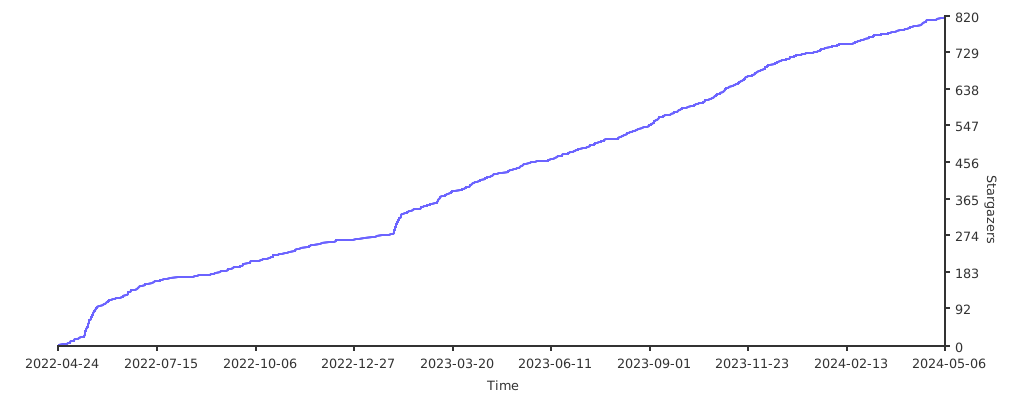
## ⭐ Star History
[](https://starchart.cc/CoderWanFeng/python-office)
---
## 📌 Contact the Author
---
## 🐞 Bug Reports & Suggestions
Please only submit issues related to the python-office codebase itself. We don't answer general Python learning questions.
- [GitHub Issues](https://github.com/CoderWanFeng/python-office/issues)
- [Gitee Issues](https://gitee.com/CoderWanFeng/python-office/issues)
- [AtomGit Issues](https://atomgit.com/CoderWanFeng1/python-office/issues)
---
## 💖 Sponsor
If python-office has saved you significant time, please consider supporting continued development:
- ⭐ **Star this repo** — the biggest support
- 🗣️ **Tell your friends** — word of mouth
- 💰 **WeChat tip** — see the QR code at the bottom of this README
- 🐛 **Contribute code** — submit a PR or Issue
---
## 📜 License
This project is licensed under the [MIT License](https://opensource.org/licenses/MIT).
```
MIT License
Copyright (c) 2026 CoderWanFeng
Permission is hereby granted, free of charge, to any person obtaining a copy
of this software and associated documentation files (the "Software"), to deal
in the Software without restriction, including without limitation the rights
to use, copy, modify, merge, publish, distribute, sublicense, and/or sell
copies of the Software, and to permit persons to whom the Software is
furnished to do so, subject to the following conditions:
The above copyright notice and this permission notice shall be included in all
copies or substantial portions of the Software.
```
---
## 🙏 Acknowledgments
- Thanks to all contributors and issue reporters
- Thanks to the [python4office](https://www.python4office.cn/) community
- Inspired by outstanding open-source projects like [Requests](https://github.com/psf/requests), [FastAPI](https://github.com/tiangolo/fastapi), [LangChain](https://github.com/langchain-ai/langchain)
- Built with ❤️ in China
---
## ⭐ Star History
[](https://starchart.cc/CoderWanFeng/python-office)
---
## 📌 Contact the Author

👉 Join the open-source community ·
WeChat the author 👈
---
If this project helps you, a ⭐ Star is the best encouragement!